Model
Get the specs of any iPhone, iPad, iPod, Apple Watch or Mac (iMac, MacBook Air, MacBook Pro...).
Second-hand, peace of mind
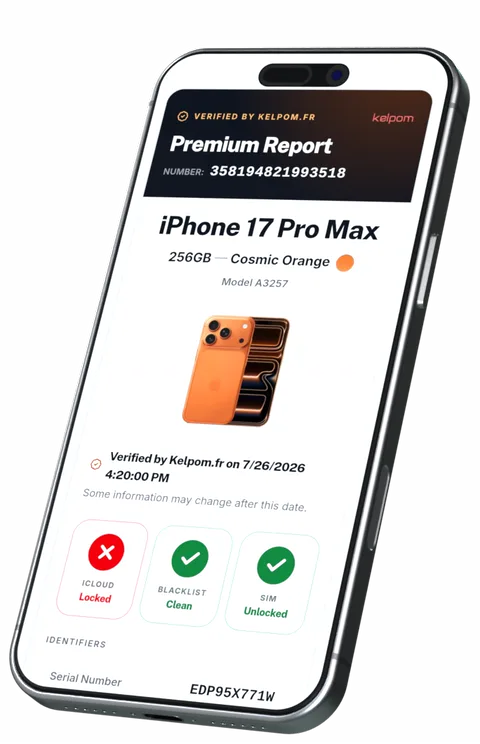
Check a used iPhone, iPad or Mac before you buy it: iCloud lock, blacklist, warranty, carrier. One clear report, in seconds.
Get the Basic Report for free — no sign-up, no card required
*#06# Dial this code on the phone to display its IMEI.
Serving buyers since
0
12 years of expertise
Numbers verified
0
Reliable results, every single check
Clients across
0countries
Trust earned around the world







Access it thanks to Kelpom!
Get the specs of any iPhone, iPad, iPod, Apple Watch or Mac (iMac, MacBook Air, MacBook Pro...).
Make sure that a device's warranty is still active and get its purchase date.
Discover the seller and the country where the device was purchased.
Verify the iCloud Activation Lock status for any iOS device, and whether Lost Mode is enabled.
Make sure that a device is not stolen by verifying that its IMEI is not in the GSMA blacklist database.
Is a device locked to a carrier? Which one? It's easy to find out with the IMEI number!
A free and easy extra precaution.
By registering on Kelpom.fr and recording your devices, your IMEI and serial numbers will be securely stored, and you will contribute to the creation of a collaborative database of lost and stolen devices.
Simply log into your Kelpom account and retrieve your IMEI and serial numbers when you need them.
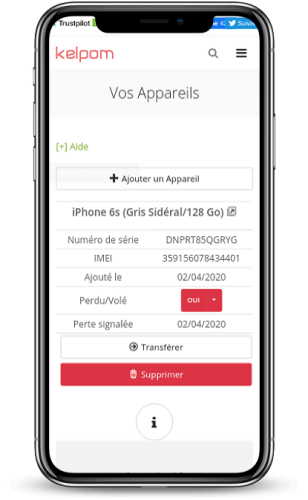
Has your iPhone, iPad, iPod, or Mac been stolen? If your device is registered on Kelpom, you can report the theft or loss through the management interface of your devices. Anyone who checks your IMEI or serial number on our site will be notified.
If you have reported your lost or stolen device, you may be contacted directly by email through the Basic Report if someone has found it. Another chance to recover your property!
Kelpom queries the same databases carriers and Apple use, then answers in plain language.
Before buying a used iPhone, iPad or Mac, a quick check tells you whether the device is safe to buy.
Enter any Apple serial number to instantly see the exact model, its manufacturing details and warranty status. A serial number check confirms the device is genuine and matches the seller's description.
An iCloud check reveals whether Find My iPhone and Activation Lock are switched on. A device still linked to a previous owner's Apple ID cannot be activated, so always run an iCloud lock check before you pay.
Our IMEI check looks up the GSMA blacklist to see if a phone has been reported lost, stolen or unpaid. A blacklisted IMEI can be barred from carrier networks, so check the IMEI before buying.
See the original carrier, SIM-lock status and remaining Apple warranty so you know exactly what you are paying for before handing over any money.